English
 Czech
Czech
 German
 French
 Italian
 Japanese
 Polish
 Spanish
 10 min read
Key Takeaways
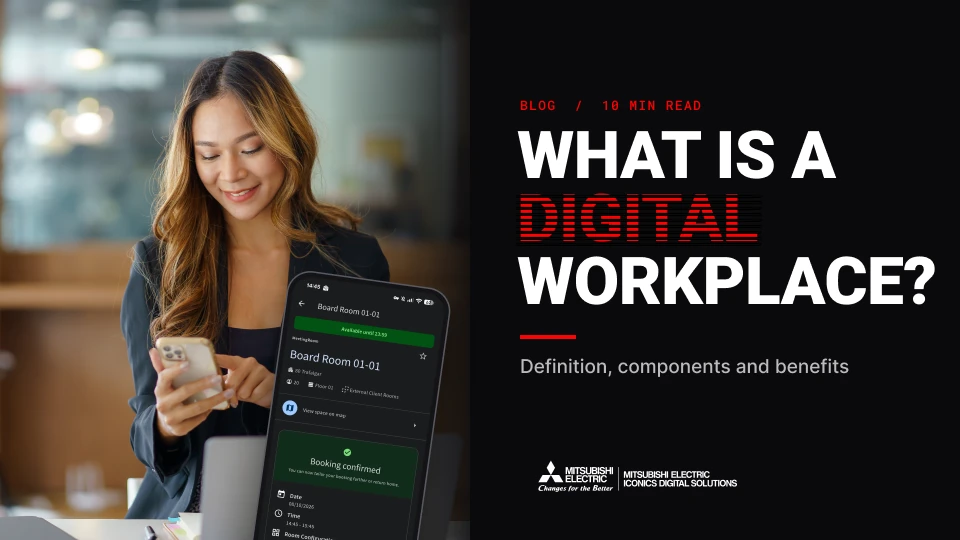
A digital workplace connects people with the physical workplace through workplace technologies, services, building systems, and data. Key takeaways include:
- A digital workplace connects people with the physical workplace, while a digital workspace provides the digital tools people use to do their jobs.
- Digital workplaces can bring together desk and room booking, workplace apps, building systems, data and analytics, and integration.
- Booking and occupancy data can help organizations understand how workplaces are used and make more informed decisions about space, services, and building operations.
- Existing building management and automation systems do not necessarily need to be replaced when organizations adopt a digital workplace.
- Organizations can start small byidentifyinga priority workplace challenge, using existing technologies, involving IT and facilities teams early, and defining clear metrics.
Why Digital Workplaces Matter
Hybrid work has changed how people use the office and what they expect from their workplace. Employees now move between home and the office, increasing expectations for a workplace experience that is flexible, intuitive, and easy to navigate. Yet many organizations still rely on disconnected workplace applications, building systems, and data, creating friction for employees, and making workplaces harder to manage effectively.
Adding another standalone application rarely solves the underlying problem. A digital workplace connects existing workplace services, building systems, data, and the teams responsible for managing them, creating a more seamless employee experience and more efficient workplace operations. Organizations can take a phased approach, starting with services such as room booking, visitor management, and service requests, then integrating building systems as their needs evolve
What Is a Digital Workplace?
A digital workplace, sometimes called a digital work environment, connects the tools people use every day with the building they work in. Booking a desk, getting through the door, finding a room, and reporting a problem all take less effort, and the people who run the building can see how it’s actually used.
“A truly digital workplace is where technology, data, and the physical environment work together to support people without getting in their way. It removes friction and makes it easy to access information, tools, and spaces. When people commute in, it should feel worth it, with activity, events, social connection, and a workplace tuned to help them do their best work.”
– Andrew Dyke, Managing Director, Mitsubishi Electric Iconics Digital Solutions UK
What Are the Key Components of a Digital Workplace?
No single product gives you a digital workplace. It’s a set of connected systems and data that support your people and the teams who run the building.
Most digital workplaces are built from these components, and you don’t need them all on day one:
- Desk and room booking, with occupancy figures that show how space is used.
- Workplace apps for your people, with wayfinding maps, visitor sign-in, service requests, and workplace news, so it’s easier to get around and use the building.
- sensors.
- Data and analytics that show how the workplace is used and how it’s performing.
- Integration, which connects workplace systems, services, and data to create a more unified digital workplace.
Integration, however, is the critical component people often overlook. You can have dozens of workplace tools and still not have a digital workplace if none of these components talk to each other or to the building.
How Does a Digital Workplace Work?
Your booking tools, room panels, and sensors already record which spaces are booked and used. A digital workplace puts that in one place, so it can make the day easier for your people and give the teams who run the building a clearer picture.
For your people, everyday tasks get simpler. Someone planning to work from the office might see when colleagues who share their plans will be there, reserve a desk or meeting room, find the right space on the floor map, adjust the lighting or temperature where the room is connected to the building’s systems, or ask for help from the same app.
Your workplace and facilities teams can use the same data to see which floors fill up and when, and, where sensors are fitted, which rooms run hot or stuffy.
Digital Workplace vs. Digital Workspace: What Is the Difference?
People often mix up the two terms.
A digital workspace includes the digital tools people use to do their jobs, such as collaboration tools, cloud apps, virtual desktops, and other software.
A digital workplace uses technology to connect people with the physical workplace, including workplace services, spaces, building systems, and data.
For example, an employee might use Microsoft Teams, SharePoint, and cloud applications to collaborate with colleagues, share documents, and complete everyday tasks. That’s the digital workspace. When an employee books a desk, sees where a colleague has booked, uses a wayfinding map, or submits a workplace service request, that’s the digital workplace.
Put simply: a digital workspace provides the digital tools for doing your work, while a digital workplace uses technology to connect you with your workplace.
How Is a Digital Workplace Different from a Smart Building?
A smart building uses connected controls and data to run the building itself: heating, cooling, lighting, access, and energy. A digital workplace focuses on the people side, connecting the tools people use in the workplace with building systems and data. A digital workplace is also often called a smart workplace or a smart office.
Many buildings already have a building management or automation system that runs building equipment effectively but lacks information about how people are using the building.
Connecting workplace and building systems adds that context. Booking data, for example, can show which floors people plan to use. Many smart building benefits, such as lower energy use and more efficient use of space, depend on understanding how the building is used. Booking and occupancy data can provide that insight.
What Are the Benefits of a Digital Workplace?
“A well-designed digital workplace makes the day feel simple before it even starts. […] I can raise service requests directly from a room or desk if something isn’t right, like a hot or cold issue, AV problems, or other faults. […] And because the building is well run, there’s no hot room to avoid and no poor air quality dragging down performance.”
– Andrew Dyke, Managing Director, Mitsubishi Electric Iconics Digital Solutions UK
For your people, the workday takes less effort. They can see which teammates have booked to come in, if they share their plans, before they commute to the office, book a desk near them, find a room on the floor map, and report a problem once instead of chasing it. Coming in is easier to justify when they know the team will be there.
For the teams who run the workplace, the gain is evidence-based insight. You can see which spaces are used and when, which problems come up most, and where demand is changing, so decisions about space and services rest on more than a hunch.
Finance will ask about space. CBRE’s January 2026 analysis of its 2026 Global Workplace & Occupancy Insights puts the global average building utilization rate at 53%. Bookings alone give the wrong picture because some people book and don’t come, and others sit at desks they never booked. So, check-in records, with occupancy sensor counts where you have them, give you a figure you can defend.
Finance teams will also want evidence that workplace space is being used effectively. CBRE’s January 2026 analysis from its 2026 Global Workplace & Occupancy Insights series puts the global average building utilization rate at 53%. Booking data alone, however, may not reflect actual space use because some employees book spaces without using them, while others use spaces without booking. Combining booking data with check-in records and occupancy sensor data, where available, provides a more accurate picture of workplace utilization and stronger evidence for space-planning decisions
What a Digital Workplace Means for Facilities Teams
For facilities teams, adopting a digital workplace doesn’t require replacing existing building management or automation systems. Existing systems remain in place, and where a Computer-Aided Facilities Management (CAFM) or Computerized Maintenance Management System (CMMS) has a connector, service requests can flow directly into the maintenance management system, allowing facilities teams to continue using established workflows.
Service requests can include the relevant room or desk, giving facilities teams the context needed to respond without relying on emails or informal requests. Cleaning teams can also use occupancy data to prioritize spaces that have been used.
Where booking and occupancy data are connected with building systems, facilities teams can adjust heating, cooling, and lighting in unused spaces. Available capabilities depend on each building’s configuration and require a building management system that supports independent zone scheduling
What Technology Enables a Digital Workplace?
The technologies that enable a digital workplace include the workplace apps, booking systems, building systems, sensors, and analytics described above. Data integration and application programming interfaces (APIs) allow different systems to exchange information, while cloud analytics bring data from different sources together. AI can identify patterns in how workplace spaces are used when sufficient data is available.
- Start small: Pick one building and the part of the day that causes the most trouble, such as getting in on a busy Tuesday, meeting rooms that are always booked and often empty, or requests that still arrive by email.
- Use what you have: A booking tool, a CAFM or CMMS, and a building management system are common starting points. Connect existing systems before replacing anything.
- Bring IT in early: IT teams will want to know how employees sign in with existing accounts, what permissions workplace tools need in Microsoft 365, and where data is held. If employees already book rooms through Microsoft 365 and Places, identify the requirements outside those systems, such as visitors, building access, room controls, and building systems.
- Bring facilities in at the same time: Agree who sets up the building side, who handles requests day to day, and who approves changes to heating, cooling, or lighting.
- Define your metrics: Whether measuring how quickly requests are closed or how full each floor is, agree on the definitions with Finance before you start.
From Connected Technology to a Better Workplace
Employees shouldn’t need to know which system booked a desk. The workplace experience should make getting in, finding the team, and getting on with the day simple.
Mitsubishi Electric Iconics Digital Solutions, part of the Mitsubishi Electric group, develops smart building software for the people who use buildings and the teams who manage them.
Ready to explore where to start?
We can assess your existing workplace tools, identify a priority challenge, and explore solutions that don’t require changes to building systems. From there, we can work with your facilities team to evaluate opportunities involving building systems.
Talk to us about where to start.
Frequently Asked Questions About Digital Workplaces
Digital workplaces bring together several technologies, systems, and workplace functions, so questions often arise about how digital workplaces work and how digital workplaces differ from related concepts. Here are answers to some of the most common questions.
What is a digital workplace?
A digital workplace connects the tools and services people use with the physical workplace. Capabilities can include desk and room booking, wayfinding maps, visitor management, service requests, workplace information, building systems, and workplace data.
What is the difference between a digital workplace and a digital workspace?
A digital workspace provides the digital tools people use to do their jobs, such as collaboration tools, cloud applications, and virtual desktops. A digital workplace uses technology to connect people with the physical workplace, including workplace services, spaces, building systems, and data.
What is the difference between a digital workplace and a smart building?
A smart building uses connected systems and data to manage building operations such as heating, cooling, lighting, access, and energy. A digital workplace focuses on how people interact with the workplace and can use building and workplace data to support a more connected workplace experience.
What are the main components of a digital workplace?
Common components include desk and room booking, workplace apps, workplace services, occupancy and space utilization data, workplace analytics, and integration between relevant systems.
What are the benefits of a digital workplace?
A digital workplace can make everyday workplace tasks easier for employees while giving workplace and facilities teams greater insight into space utilization, service requests, occupancy patterns, and building performance. More reliable workplace data can also support decisions about space, services, and operational resources.
Do organizations need to replace existing building systems to create a digital workplace?
No. Existing building management or automation systems can remain in place. Organizations can introduce digital workplace capabilities gradually and integrate existing systems where appropriate.
How should an organization get started with a digital workplace?
Start with a specific workplace challenge in one building, assess existing technologies, involve IT and facilities teams early, and define the metrics that will measure success. Organizations can then expand digital workplace capabilities as requirements evolve.

Written By:
Recent Posts
What Is a Data Historian in OT? Definition, Architecture, and Applications
The High-Performance Office: Turning Data, AI and Smart Tech into Measurable Asset Value
Why Master Systems Integrators and Digital Enablement Decide Whether a “Smart” Building Is Actually Smart
The Swim Isn't the Race: Are We Looking at Only Part of AI's Impact?